

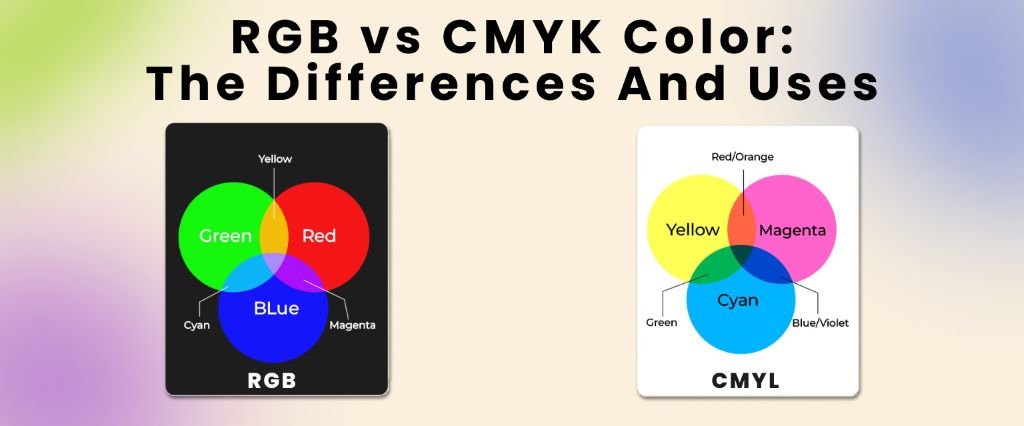
Both RGB and CMYK are color models. These models produce millions of colors by mixing three main base hues. The birth of millions of colors occurs when we alter the amounts of these bases. However, they are used for entirely different purposes. RGB is used for digital screens and CMYK for physical printing.
It’s important for anyone who works with colors, papers or screens to know the difference between RGB and CMYK. This blog provides a clear-cut difference between the two color models. It covers the definition, uses, and differences and tells you which one to use.
What is RGB
To get to the gist of it, first, we will explain the true definitions of both. RGB stands for red, green, and blue. These colors are primary colors of light, and RGB uses light to define its colors. The three colors are combined in several ways to produce a broad spectrum of colors. This model is used in electronic displays such as smartwatches, phones, and computers. Digital electronics use red, green, and blue bulbs, which radiate at various intensities to show color on LED screens. Now let’s see what CMYK is for a better understanding of the RGB vs CMYK color profile.
What is CMYK
CMYK stands for Cyan, Magenta, Yellow, black and the K stands for Key. It is entirely different from RGB. The RGB model adds color, but CMYK works by subtracting the light absorbed by inks. It removes the primary colors of light from any white light that hits it.
The CMYK System and Subtractive Color Theory
Imagine each colored ink as a filter:
Cyan (C):
It is a greenish-blue color that is widely used in printing inks, and it absorbs red light.
Magenta (M)
This purplish-pink color is also broadly used in the printing process. Magenta absorbs green light.
Yellow (Y)
It is a bright, sunny color. It rounds out the trio of primary colors in CMYK and absorbs blue light.
Key (K)
The key, or black ink, soaks up all colors of light. It adds sharpness and depth in printed images. That’s why it is known as key, as it provides key detail.
Now that we are aware of the pure definitions of these color models, let’s see the key differences.
The difference between RGB and CMYK
Apart from the main differences between RGB and CMYK, there are other differences, such as the primary colors, mixing mode, maximum color yield, and more. The RGB color system has a huge number of colors due to the 16.7 million color options available, compared to the CMYK color system, which has only 16,000 color options. The other differences to focus on are:
Here’s a table for quick understanding.
| Comparison Aspect | RGB | CMYK |
| CMYK color vs RGB (color type) | Additive, built from light | Subtractive, built from ink |
| CMYK vs RGB color space | Uses red, green, and blue light; all three combine to make white | Uses cyan, magenta, yellow, black ink; overlapping inks absorb light to form dark colors |
| RGB color vs CMYK (base) | Starts from black, adds light | Starts from the white paper, subtracts brightness |
| Color mode RGB vs CMYK (use case) | Used for screens, web, apps, video | Used for print, packaging, and brochures |
| How many colors in RGB vs CMYK | ~16.7 million colors (8-bit) | Smaller, variable range depending on ink/paper |
| RGB vs CMYK color model | Additive color model | Subtractive color model |
| RGB vs CMYK color spectrum | Full luminous spectrum via light | Muted spectrum via layered ink |
Knowing the difference will help you decide which color model you should use. However, if you are confused, we have listed the uses of both color systems.
When to use RGB
Use RGB when you are working on electronics and digital devices such as phones, smartwatches, and computers.
You should use it in these situations:
| Category | Examples |
| Branding | Online logos Online ads |
| Visual content | Video Digital graphics Infographics Photographs for websites, social media, or apps |
| Web and app design | Icons Buttons Graphics |
| Social media | Images for posts Profile pictures Profile backgrounds |
Here are some suggestions for suitable file formats for RGB.
The best file formats for RGB
- PSD: It’s a standard source file for RGB documents. If anyone’s using the files is working with Adobe Photoshop.
- PNG: If an image has to be placed over another image, then the PNG format should be used, as PNG is transparent in nature.
- GIFs: They are to be preferred when something like bouncing icons or animated logos needs to be created.
- JPEGs: They’re the best for RGB due to their readability, and they are a nice middle ground between file size and quality.
Do not use TIFF, EPS, PDF, or BMP for RGB images, as these formats are not suitable for most of the software and are excessively large in size.
When To Use CMYK
If you are confused about whether to use RGB or CMYK for your physical print design, then CMYK is the answer. It is commonly used when it comes to printing design. Use CMYK if you are working on these projects.
| Category | Examples |
| Advertising | Billboards Posters Flyers Vehicle wraps Brochures Branding |
| Business cards | Stationery Stickers Signs and storefronts Custom paper bags |
| Merchandise | T-shirts, hats, and other branded clothing Promotional swag (pens, mugs, etc.) |
| Essential print materials | Product packaging Food box packaging Restaurant menus |
Let’s see what file formats are used for CMYK
What are the best file formats for CMYK?
The following file formats provide ideal quality when you are using CMYK
- PDF: It is ideal for CMYK files due to its universal compatibility with different applications.
- AI: If you are using Adobe Illustrator, then this is a common file format for CMYK.
- EPS: It is another good option for source file format since it works well with different vector software.
Conclusion
RGB and CMYK are used to achieve distinct goals. RGB adds, whereas CMYK subtracts.
Digital screens use RGB, and physical printing uses CMYK. This is the only information you need when you are deciding what color model to use. However, if you’re still not sure and want your own custom boxes, we’re available. At Packlim, we have everything from gift packaging boxes to custom apparel boxes. We are a Canada-based company with years of experience in satisfying our clients.
FAQs
CMYK vs RGB color difference?
RGB is a color model consisting of red, blue, and green. These colors are primary colors of light, and RGB uses light to define its colors. CMYK uses Cyan, Magenta, Yellow, and Key (Black) ink for printing. It is a subtractive process
CMYK color space vs RGB?
The RGB color system uses the primary colors Red, Green, and blue, and is used for designing electronics such as phones and computers. The CMYK(Cyan, Magenta, Yellow, Black) color model is for physical printing, and it works by absorbing light.
RGB vs CMYK color range?
RGB is used for digital screens and uses light to produce a wide range of bright colors. CMYK is used in printing by mixing inks to create a smaller, more restricted range.