

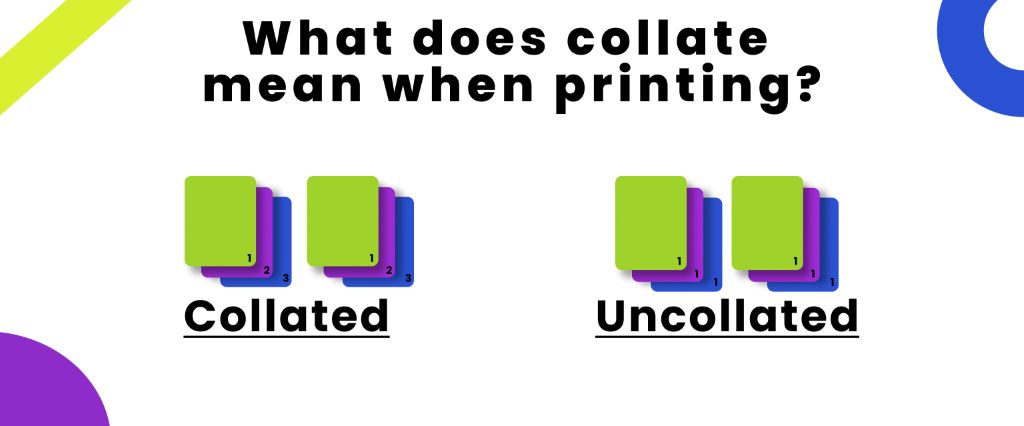
Collate means each copy of a multi-page document should print in the correct page order. Collated printing reduces extra time by removing the need to sort pages manually. In printing, collating is the best option for reports, booklets, manuals, presentations, and school assignments.
When printing is uncollated, it groups identical pages making manual assembly difficult. Collating works best when printing is both single-sided and double-sided. Collate options are also available in most printers and PDF applications in print settings.
What Does It Mean to Collate When Printing?
Perhaps you have seen the “Collate” feature that appears in the printing options every time you start printing. Mostly, people tend to overlook this feature since they are not even aware of what this feature is all about. But understanding the importance of what collating means by collating in printing will help you a lot when printing large pages.
In simpler terms, collating in printing means assembling the pages according to their page number. Instead of printing page 1 then 2 you can just put all the pages in the printer and click the collate option. It will assemble all the pages without the need for manual labour.
What Does Collate Sheets Mean When Printing?
The sentence what does collate mean when printing pages usually refers to the order in which pages need to be printed. Collating in printing doesn’t change the document content or anything written in it. It just prints the document in the correct order by changing the unassembled sequence of the pages. This option is important when printing large documents such as reports, proposals, or how-to guides where the sequence is important.
Benefits of Collating When Printing
In printing, collating is very beneficial. There was a time when we lived in the dark ages where we had to collate everything manually because we didn’t have the option but nowadays collate has made everything easier.
- Collating rearranges papers automatically, which saves time and energy.
- It reduces the chances of pages being mixed up.
- Collation makes stapling and binding much easier.
- This improves efficiency while printing multiple copies.
- It gives a professional appearance to the documents.
Common Use of Collate When Printing
Collate is important when you have to print multiple copies in a sequential order. Instead of arranging pages by hand, you can use collate printing for better results. There are many workplaces where we have seen collate printing providing valuable services. Some common uses of collate printing are
- In Business Reports when you have to print complete reports for meetings etc.
- Collate is mostly used in school assignments where teachers and students can print multiple copies of the project.
- It is also used in training manuals where companies often print employee handbooks and training guides.
- It also helps in presentations by keeping every presentation packet complete.
- Collate printing is also used in instruction booklets to print guides and other manuals in complete order.
Collate Printing Example
The following example illustrates the actual process of collating. Let’s imagine that you are working on a handbook for new employees and you need 3 copies for the new employees that are arranged in a sequential order so with the collate option you can get the result.
- Employee 1: Pages 1–6
- Employee 2: Pages 1–6
- Employee 3: Pages 1–6
With collating, you will get more arranged results, but without collating, where you have to manually rearrange the pages, you will get the result:
- Page 1 ×3
- Page 2 ×3
- Page 3 ×3
- Page 4 ×3
- Page 5 ×3
- Page 6 ×3
This example shows how collate printing saves time and reduces the work.
Collate Vs Group Printing
Collate vs group printing are the words that we use interchangeably because both organize pages but in a different way. The table below highlights the key difference between collate vs group printing:
| Key Features | Collate Printing | Group Printing |
| Printing order | Print one document before printing the next one | Print all documents at the same time |
| Best for | Reports, presentations, manuals | Printing pages for separate processing, proofreading |
| Manual sorting | No | Yes |
| Ideal for multiple copies | Yes | No |
What Is Collated And Uncollated In Printing?
Collate and uncollate printing are mostly used when we have to print multiple copies. While printing you can choose between collate and uncollate printing. The best printing options depend on how you want your pages to be organized.
| Key features | Collated printing | Uncollated printing |
| Manual sorting | No | Yes |
| Page order | 1,2,3, 1,2,3, 1,2,3 | 1,1,1, 2,2,2, 3,3,3 |
| Page management | Ready to use | Assembled manually |
| Risk of mixing pages | No | Yes |
| Time taking | No | Yes |
.
Is Collate Printing Double-Sided?
No, collating is not double-sided. They are both different terms, and they have different features. Collating means to arrange each document in a sequential order, whereas double printing means printing on both sides of the paper to reduce cost and have less consumption of the paper. Collating and double printing work independently, but both of these settings can be used by combining depends on your choice of printing.
Conclusion
If you know about collating in printing, it can help you print documents more efficiently and keep your copies organized. If you are a businessperson or a student, trainer, or giving a presentation, collating printing has you covered. Collate options in printing ensure that your time and energy are preserved and you get organized work. If you want more expert guides on printing, packaging, or any solution in Canada visit Packlim and explore the latest resources to make your work much easier and more presentable.
FAQs
What Does Collate Mean When Printing Multiple Copies?
While printing multiple copies collate means to print different copies of the same document but in sequential order. This makes sure that each copy, after printing, is ready to be handed out immediately without the need for manual assistance.
What Does Collate Mean When Printing Pages?
In printing pages collate means to print different sets of each copy that are arranged in a proper sequential order. When the setting is on it prints the document in sequential order but when the setting is off it prints each copy many times without any order.
What Does Collate Mean When Printing 2 Copies?
Collate meaning remains the same no matter how many copies you want to print. If you need to print two copies you can specify that number and if you need to print multiple copies you can specify that too.
What Is Collate In Printing PDF?
If you frequently use printing you might be curious if collation works with a PDF document. Collating works in the same manner as it does with other documents. It manages the sequence of the PDF document while printing.
What Is Collate In Printing?
Collate in printing is a setting that is used when you want to print multiple copies of a document but in a sequential order so you don’t have to do manual labour. Collate in printing saves time and also reduces the effort and risk of mixing up the pages.